This is the onboarding Cam wants.
Build to THIS mockup only.
Cam walks through it himself, then sends it to Shaan. If anything you build looks or behaves differently from this mockup, the mockup wins. Older mockups are listed below: do not use them.
Open the mockup (Mia Storm, starts from zero) Today vs afterThe mockup is fake data in a browser. Nothing is saved. The Start again button (top right of Mia's page) resets her to zero.
Do not use Old mockups (all superseded)
These were earlier tries. Some of them have buttons that lead to old pages (old Models hub, old Analytics, old Operator board). Do not copy anything from them.
- operator rebuild v3, v4, v5, v6, v7, v8, v9, v9.1
- proxy reuse
- stream test plan
- stream test crm
- onboarding sign-in mock
- sign-in browser
- onboarding plan
onboarding mockup final(this folder)- Start page:
app.html#/record/mia
The IP choice (generate a new IP or use one we already own) was approved by Cam in the "combined" round and is kept exactly the same here.
Rule The menu: only today's menu
- Analytics
- Operator
- Issues
- Accounts
- Onboarding
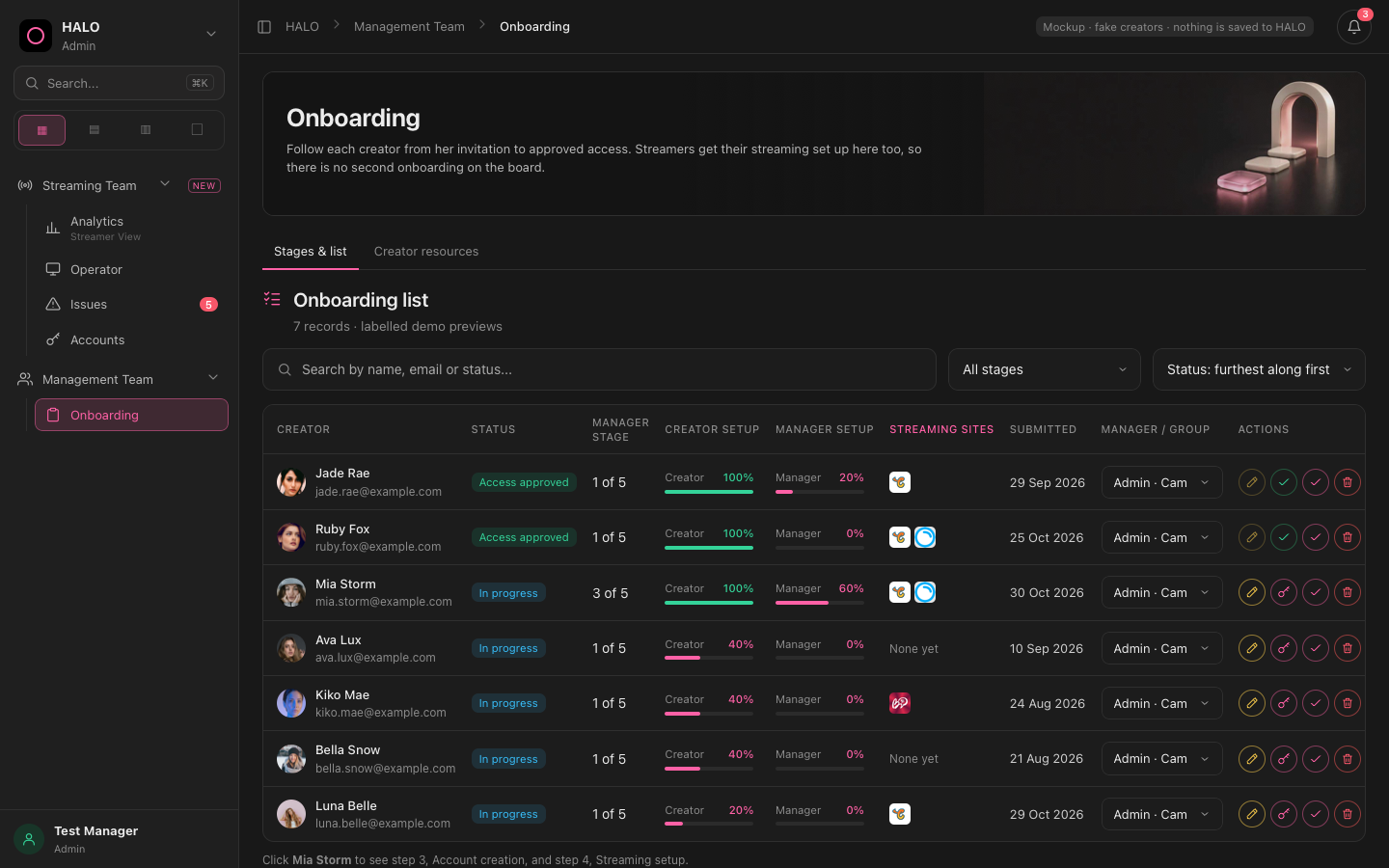
The whole menu, as built in this mockup.
The 5 steps, one by one
Manager's progress shows 5 steps in a left column. Cam only works top to bottom.
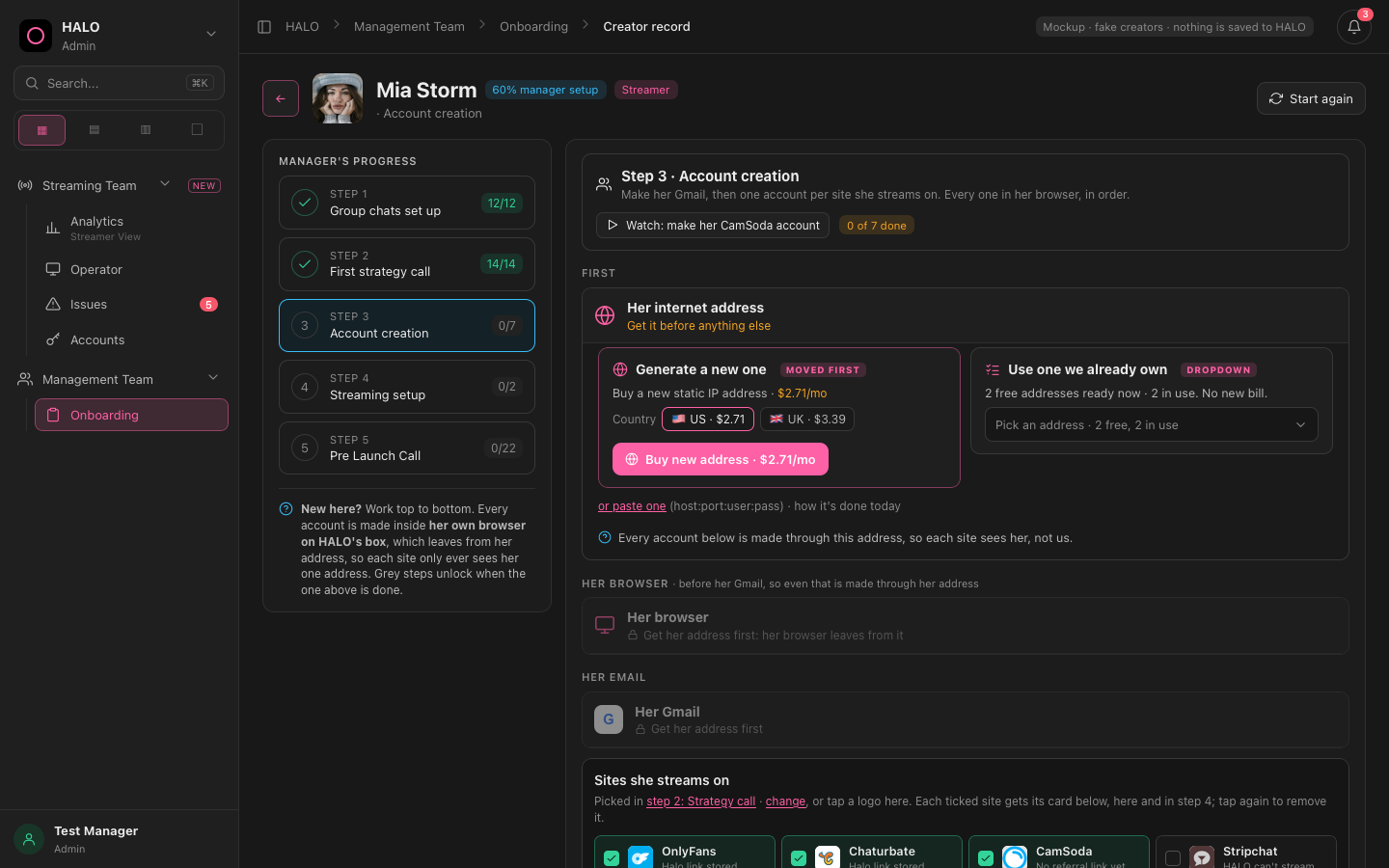
Mia from zero. The left column is the 5 steps with counts.
Step 1 Group chats set up (12/12) Keep as is
Step 2 First strategy call (14/14) Keep as is
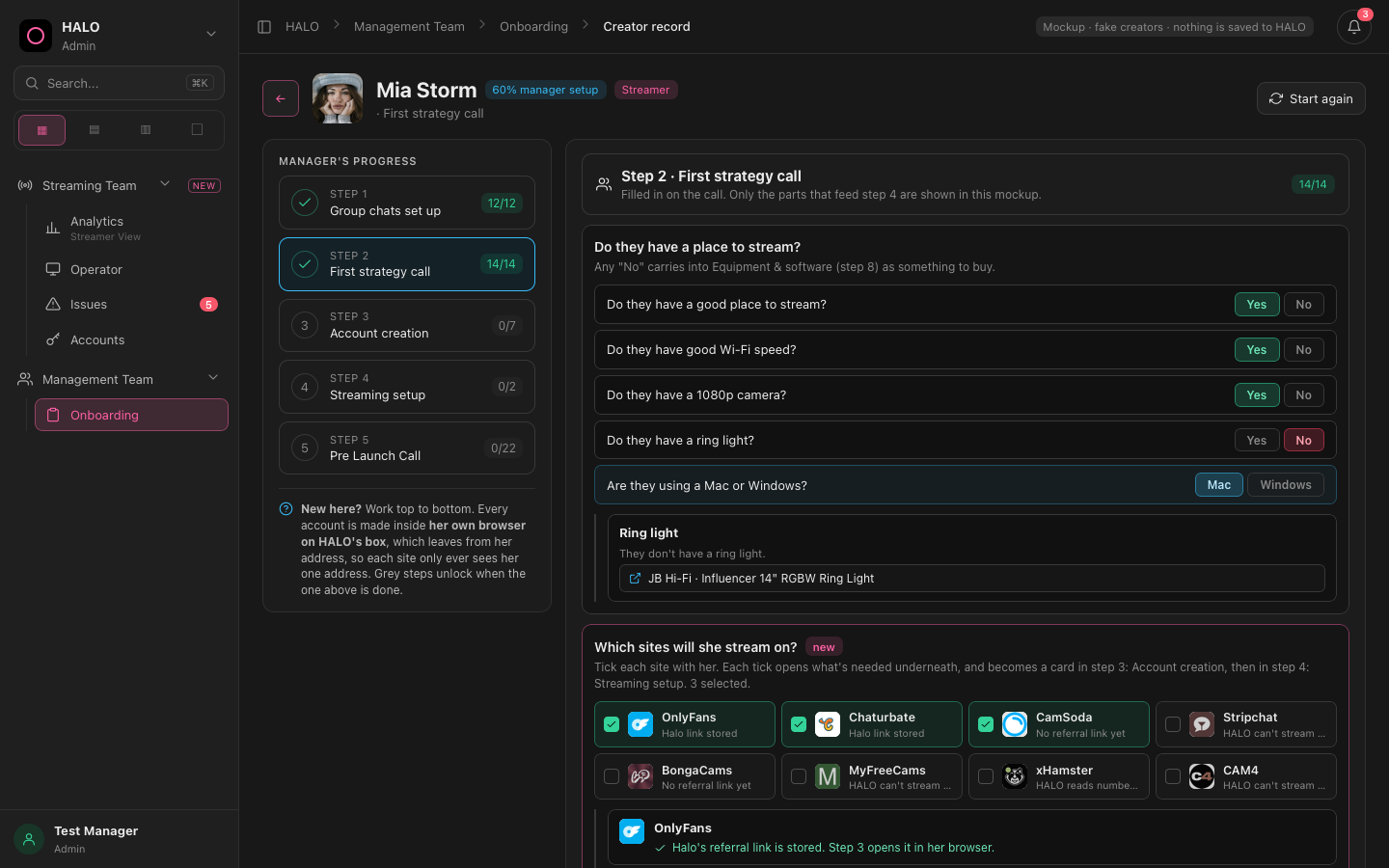
Step 2 in the mockup shows only the parts that feed the later steps (which sites she streams on, her tip menu and goals). Everything that is on DEV today stays.
- Ticks the sites she streams on. This list is what steps 3 and 4 use.
- Writes down her tip menu and tip goals from the call.
- A site tick adds that site to step 3 (account) and, once the account is made, to step 4 (setup).
- Nothing yet.
Step 3 Account creation Box does a lot here
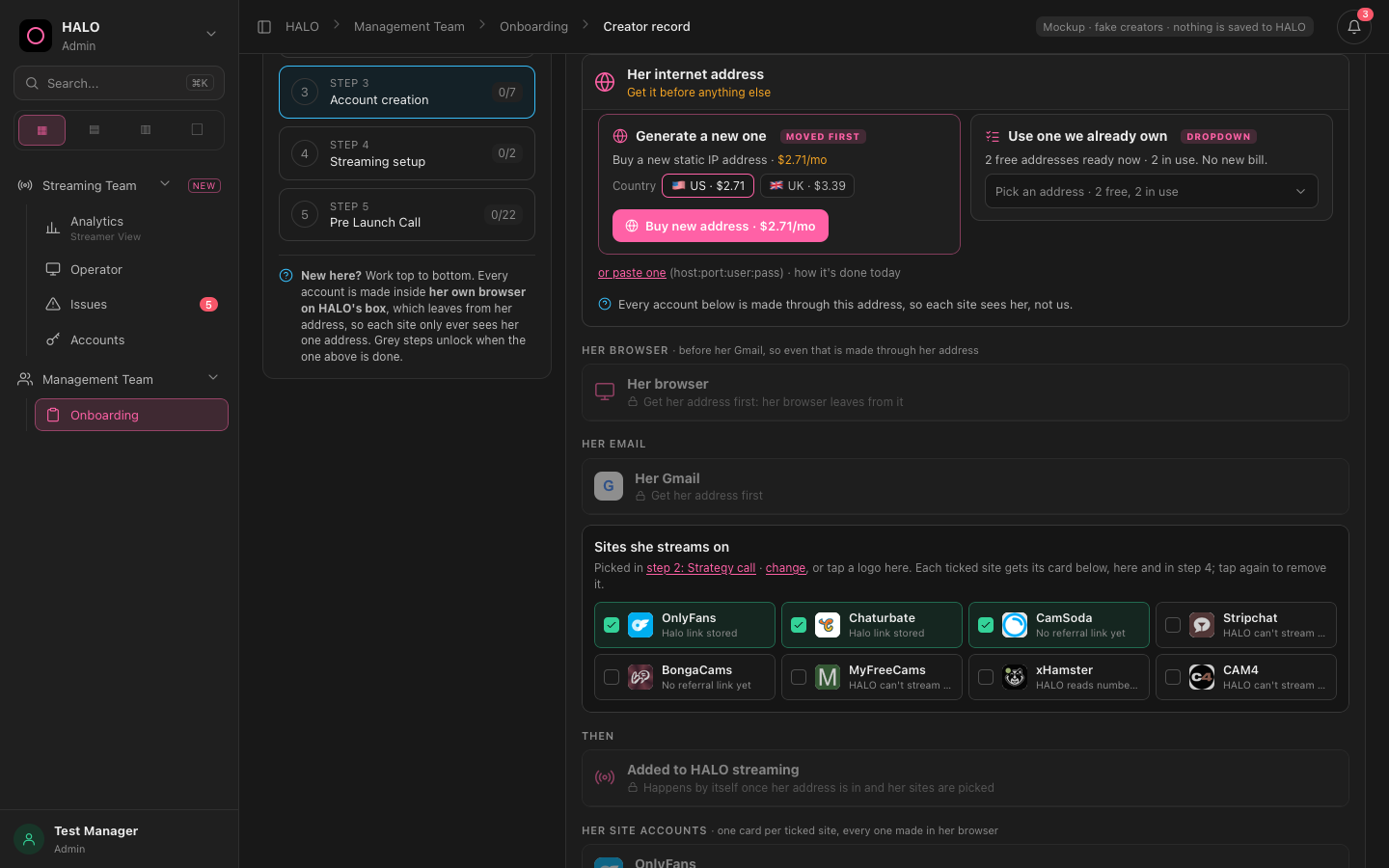
Approved by Cam. Do not change.
- Generate a new one (pick the country, then buy). The box buys it and assigns it to her. A line goes into the Payment Log.
- Use one we already own (dropdown). Free ones are plain. One that is in use by another creator shows a warning and needs a tick before it can be taken.
- When done: a green done card with Release and Swap.
- A banner says "On the box for Mia Storm" and that she is ready for her Gmail.
- Open her browser opens a split view: her browser on the left, "Her details" (username, password, email) on the right. It is the same one browser for every site, always leaving from her one IP.
- Check her IP opens a what-is-my-IP page in her browser. Green only if it shows her address.
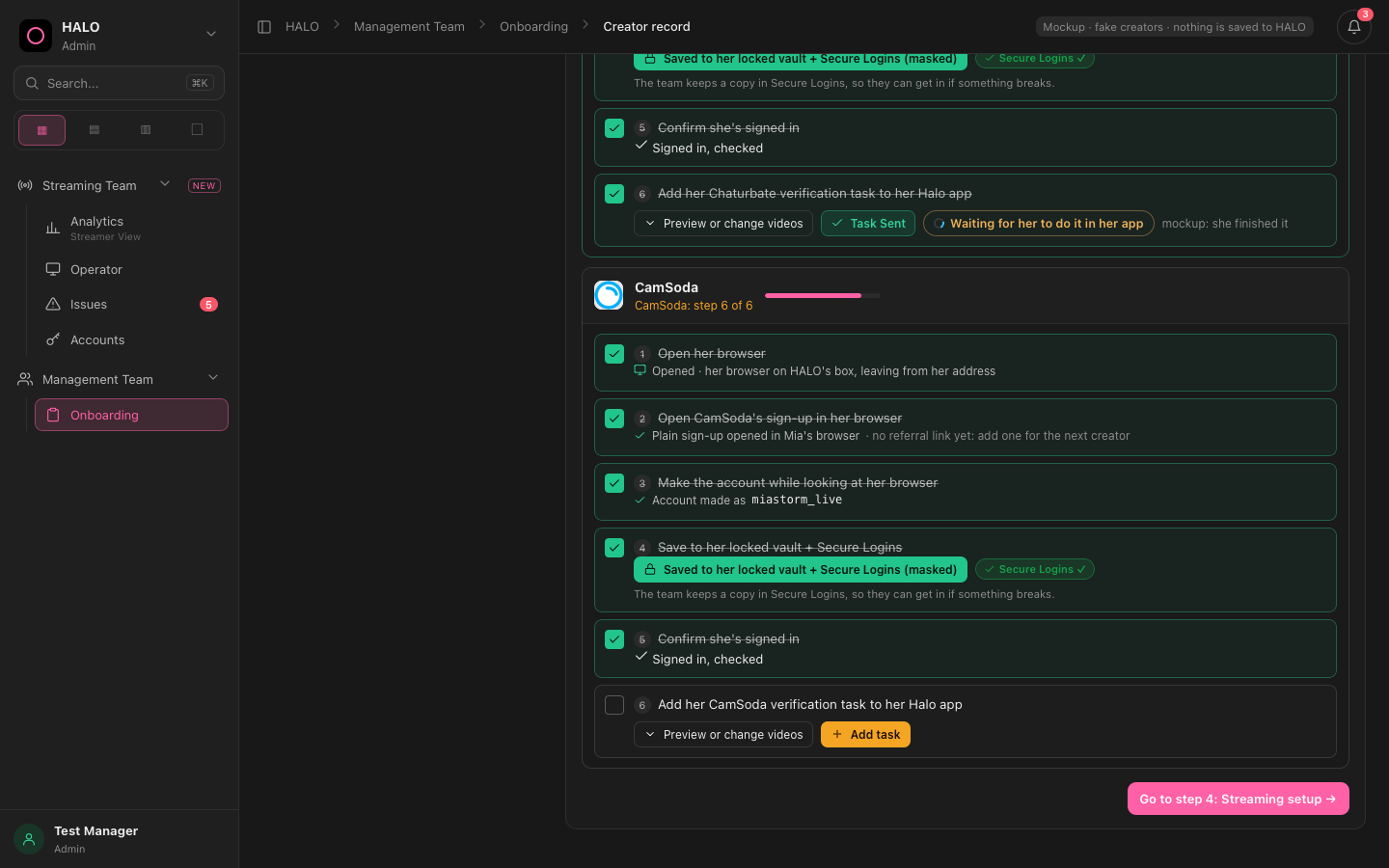
- Open her browser (split view).
- Open the site's sign-up in her browser (with Halo's referral link if there is one).
- Make the account while looking at her browser. If the name is taken, change it on the right and copy it in again. If the site emails a code, it lands in her Gmail tab and can be pasted from there.
- Save to her locked vault + Secure Logins. One press saves in both (masked in Secure Logins for the team).
- Confirm she's signed in. This ticks by itself when the box sees her signed in.
- Add her verification task to her Halo app. Unlocks only after item 5 (signed in). Not a plain checkbox: it is the orange Add task button plus Preview or change videos.
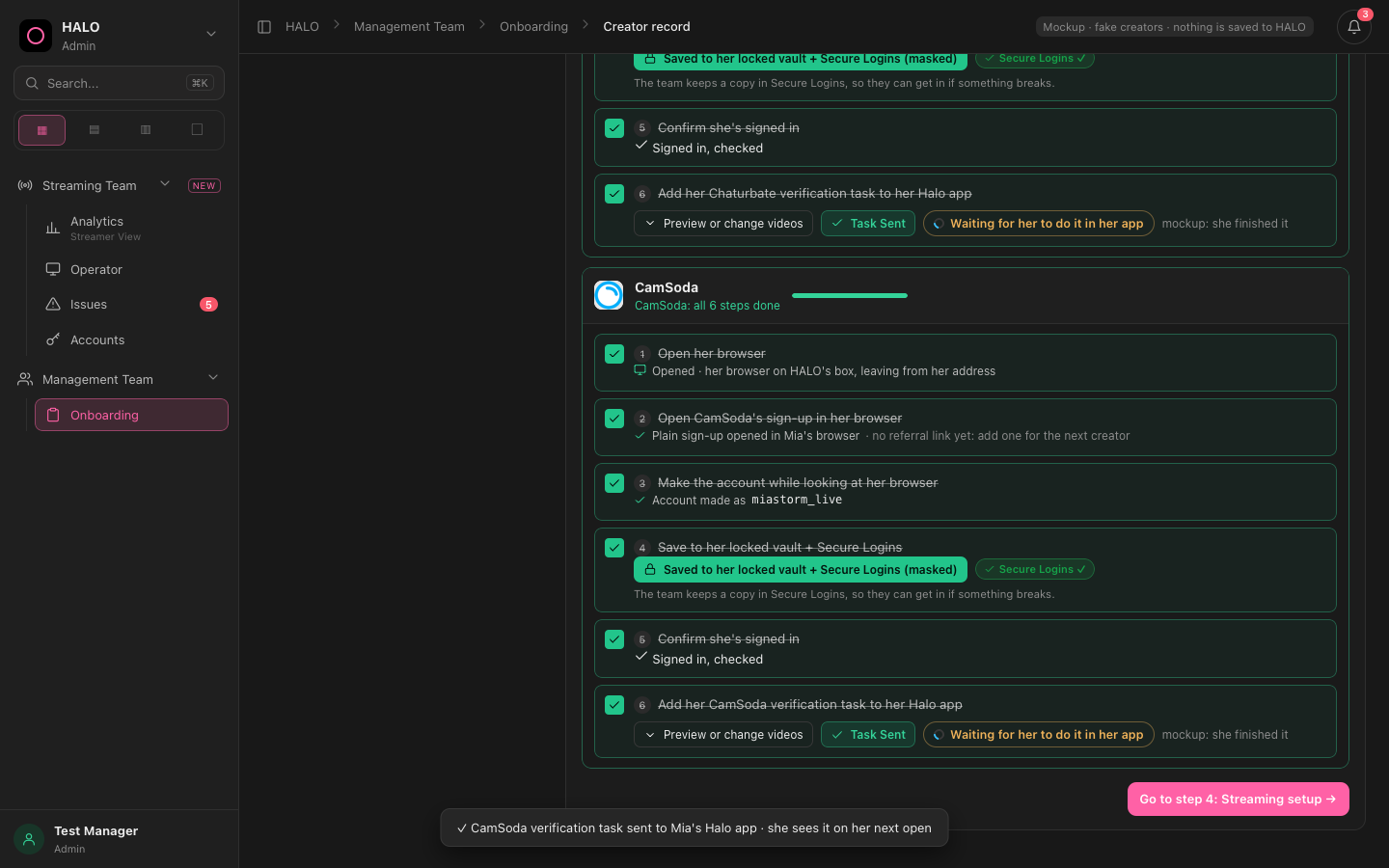
Sent then Waiting: the task is in her app, waiting for her to do it.
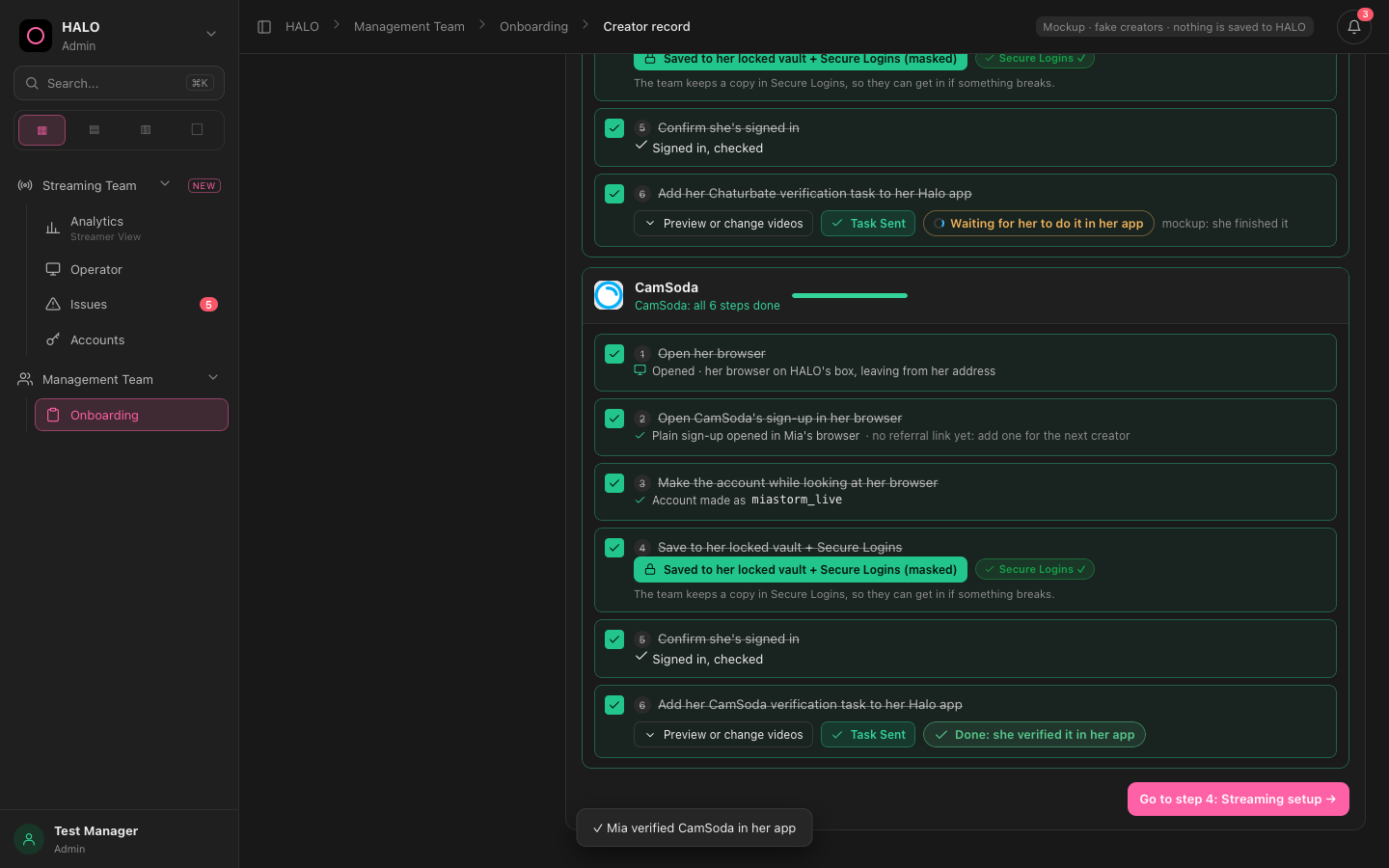
Done: she verified it in her app.
- Add task sends the task to her Halo app. Button turns into "Task Sent".
- Preview or change videos shows the how-to-verify videos for that site, and lets the manager swap one.
- OnlyFans adds 2 tasks. Gmail has no task (it has 5 steps).
- The row ticks when the task is sent. Waiting and Done are shown next to it. In the mockup, a small "mockup: she finished it" link fakes her finishing.
Step 4 Streaming setup No verification tasks here
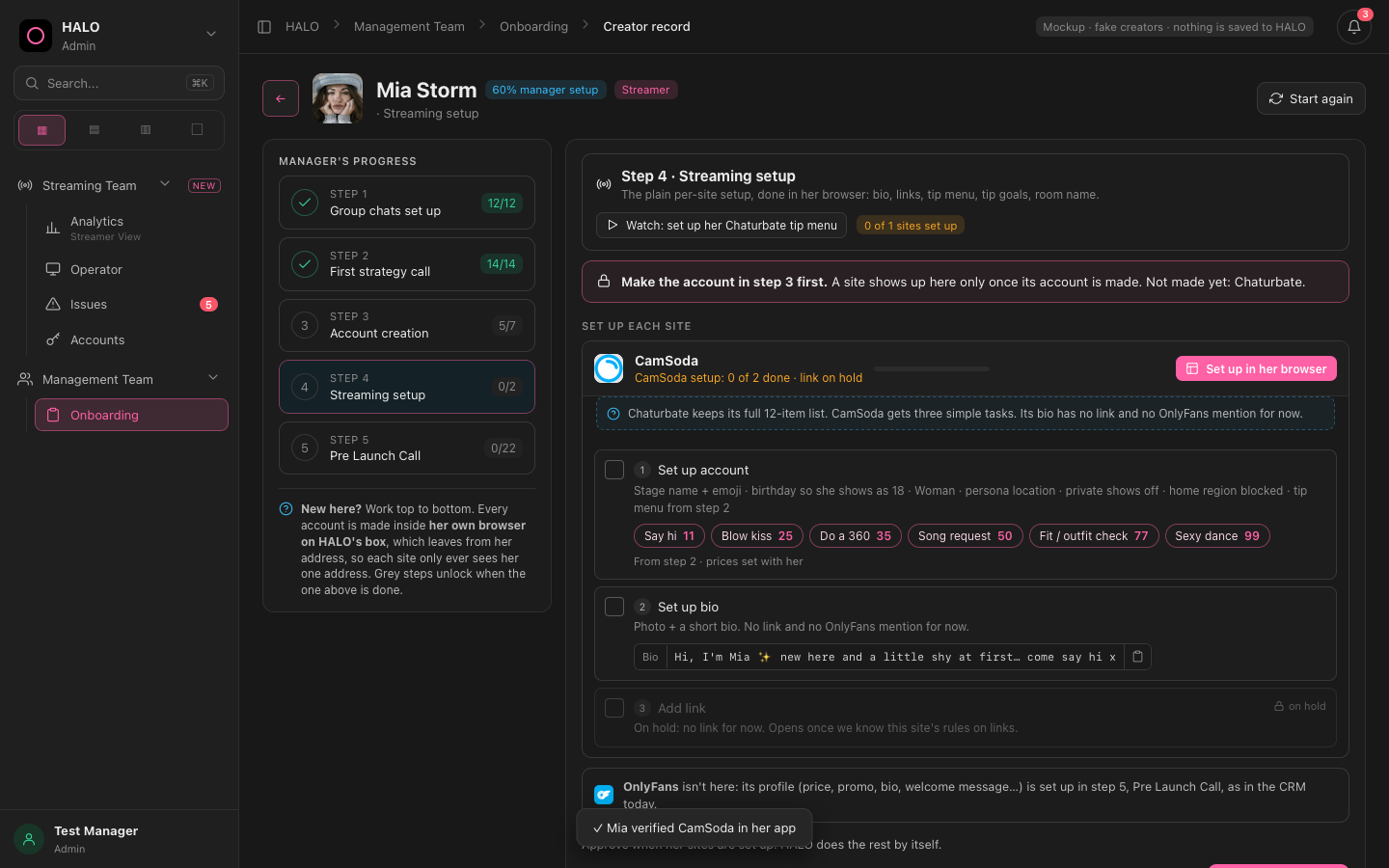
Here only CamSoda has an account, so only CamSoda is shown. The rule is written plainly at the top and names Chaturbate as not made yet. When Chaturbate is made in step 3, its card appears.
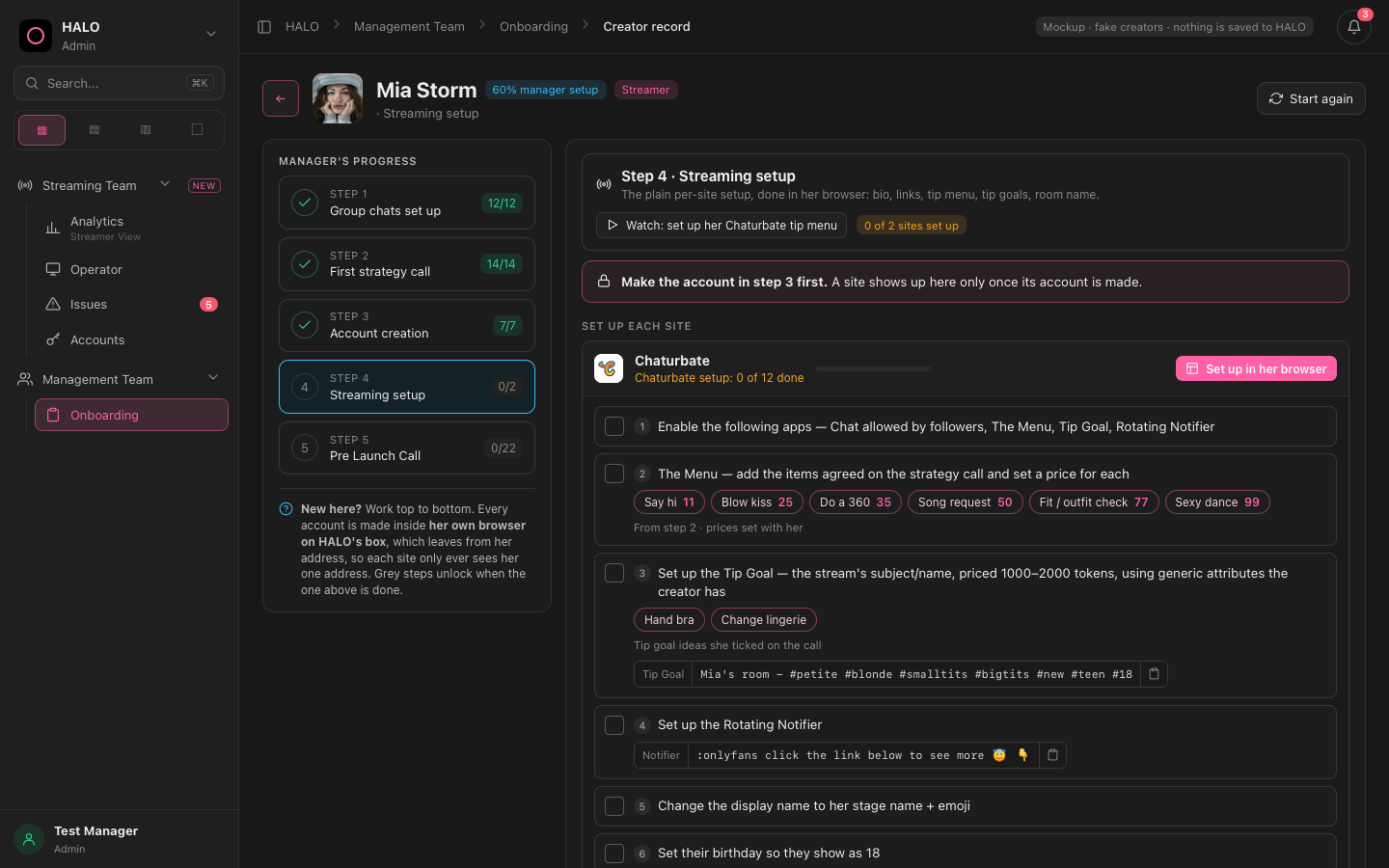
Chaturbate has the full 12-item list (apps, tip menu, tip goal, notifier, profile, settings).
- Per site, through Open her browser: bio / About me, links, tip menu, tip goals, room name. Boring setup only.
- Stream key only if a site needs one (see the box notes below).
- A site appears here only once its account is made in step 3. The page says: "Make the account in step 3 first."
- No verification tasks in this step. No "connect her to streaming" block. No test-stream row.
- OnlyFans is not here. Its profile is in step 5, as on DEV today.
- Set up in her browser / Carry on in her browser opens her browser with the site's CRM checklist on the right. Each item opens the right page of the site. The manager does it by hand, then ticks it.
- Approve access closes the step. One quiet line sits above it ("HALO does the rest by itself"). The list of automatic jobs is no longer shown.
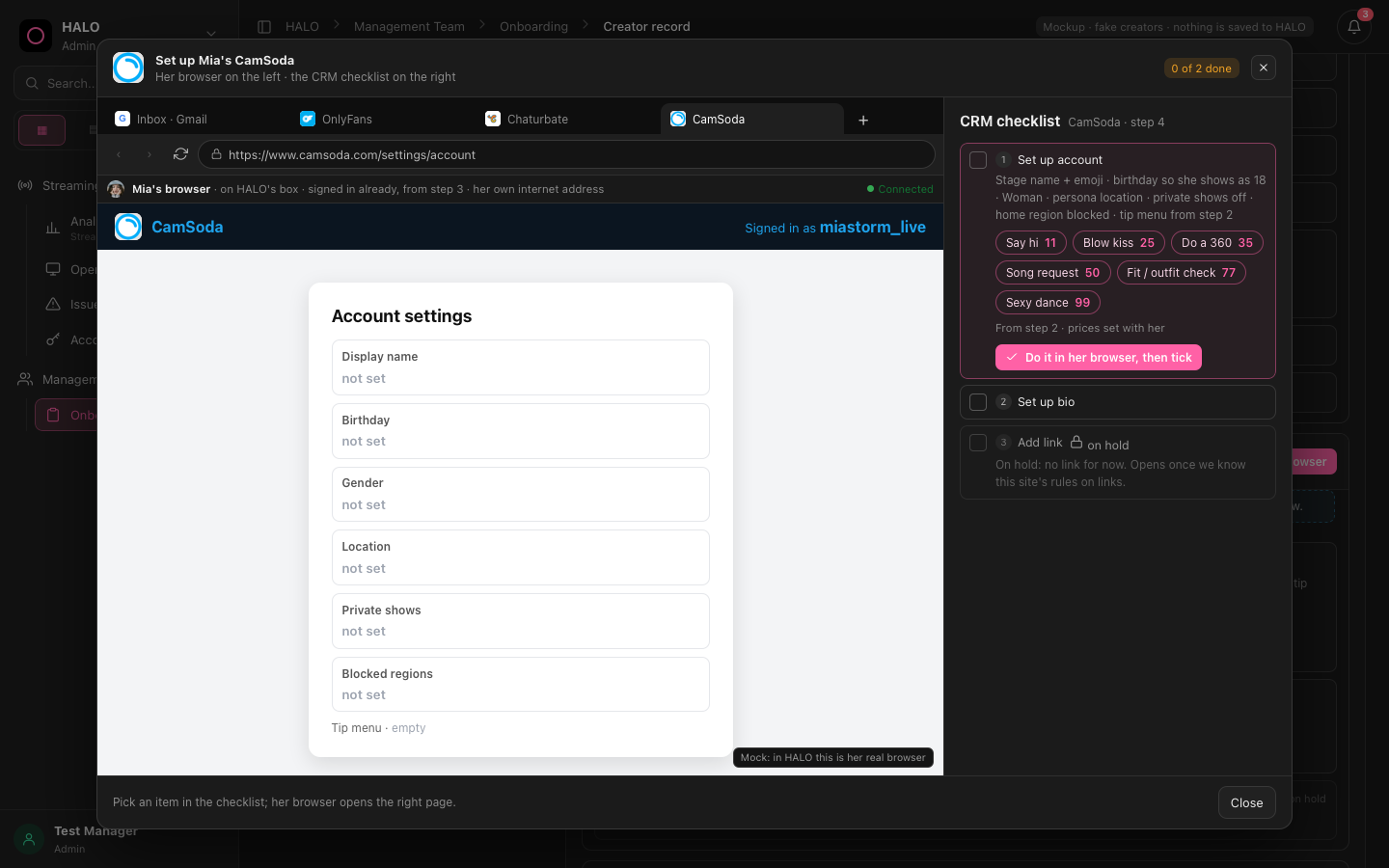
Her browser (left) and the CRM checklist (right).
Step 5 Pre Launch Call (0/22) Keep as is
Box What the box must do behind the buttons
The mockup only pretends these. Build them for real. Cam's words: "we log into the box, we sign her in, we get whatever stream keys, I'm pretty sure that is done by the box."
| When | What the manager sees | What the box must do |
|---|---|---|
| Step 3a | Generate a new IP, or use one we already own | Buy the IP (or take a free owned one, warn if in use), assign it to her, save the proxy login in Secure Logins, add the Payment Log and subscription lines. Release and Swap must free or change it. |
| Before her browser opens | "On the box for Mia Storm" banner | Sync first: put her address on her browser before it opens, so the sites only ever see her one IP. |
| Step 3 / 4 | Open her browser split view | One browser per creator on the box, leaving from her IP, shown live in the panel. One tab per site, plus her Gmail tab. |
| Step 3, item 3 | Code arrives in her Gmail | HALO Gmail reader reads site sign-up codes and shows them in her Gmail tab. |
| Step 3, item 4 | Save to vault + Secure Logins | Store the password in her locked vault and a masked copy in Secure Logins for the team. |
| Step 3, item 5 | "Signed in, checked" ticks by itself | Signed-in check: the box signs her in and confirms she is in. Re-checks about every 30 s and signs her back in. |
| Step 3, item 6 | Add task, Sent, Waiting, Done | Send the verification task (with the site's videos) to her Halo app. Report back Sent, Waiting, Done. |
| Step 4 and Go Live | Nothing (no stream-key step is shown) | Stream keys: the box reads/gets each site's stream key itself. The manager copies nothing. (Chaturbate, CamSoda, Stripchat.) If a site needs the manager to do something by hand, add it as a plain setup item in that site's step 4 checklist. |
| After Approve | One quiet line only | Accounts grid pull: she appears on the Accounts grid and the Operator strip. Not listed on screen. Do not send her any "streaming app link" (Cam: not needed). |
Keep on DEV Things to keep and one question
- Steps 1, 2 and 5: every item stays. The group chats, the strategy call items and the pre-launch call items on dev.haloangels.net must all still be there, same as before this work. Cam: "make sure all the information in one, two and three that was previously there is still staying."
- Keep the tips and goals from step 2 feeding step 4.
"Streaming accounts" section at the bottom of many pages on dev.haloangels.net.
Cam saw a section called "Streaming accounts" at the bottom of many pages on dev.haloangels.net and does not know why it is there. This mockup does not have it. Please find out what puts it there and tell Cam. Do not remove it, do not move it, until Cam decides.
Cam's feedback, word for word
Spoken, 10 Nov 2026, after walking the "combined" mockup. Speech-to-text, so some words are odd (for example "Haley" means HALO).
Cam, 10 Nov 2026, after walking onboarding mockup combined (Mia fresh), verbatim:

Okay, so this is, yeah, kind of how I wanted it. This is exactly what you just opened up as perfect. The only thing that I just do want to make sure that we're not making a mistake on is I see the account creation part where we're selecting, you know, where we want to stream. So the site she streams on, which we can see in step three of account creation. But then when I go to streaming setup, obviously the page looks a little bit different. I see when you approve, Haley does this by itself. I don't think we need to see that. It's fine that it does it. But I'm confused. It says send her the streaming app link. I don't know what that's entirely doing. Pulls her accounts. Pulls her on the accounts grid. Yes, we want that to do. But I don't need to see all of this stuff. But in terms of sending her the streaming app link, I don't think that needs to be done. And then we have the account creation. And then in terms of the step four streaming setup, that looks I'm trying to work my head around how that all entirely works and I think I should probably mention is please make sure that whatever is currently before these changes were made in terms of like the group chat setups and stuff like that like we had i can access all of them but i don want you it looks like even on the app dev you added the streaming accounts to the bottom of like every page i think which i don't know why that's showing there so just make sure like all the information is that one two three that were previously there are all you know still staying um because it does like we've lost a part of it where if i look where we send her the task in terms of the streaming setup so obviously for every single one we log into the box we will obviously sign her in we'll get whatever stream keys i need but i'm pretty sure that is done by the box like it does most of that stuff uh but there's no room for like no section anymore to like add their task which is like i don't know what's going on there um obviously every account needs to be set up i guess before we can even go to the streaming app which is why they're not showing up with what I'm looking at right now they need to be set up before they can obviously we can do the or we need to be created should I said before you set up but yeah that is pretty much it we will always log in through the open her browser part for every single creator just make sure that we can also add the tasks so once the accounts are created they know how to verify them and I'm assuming the verification steps where we're adding the task is probably done at account creation because we can't set up any of the accounts if they haven't been verified so step four should literally just be you know adding the menus or the you know setting up the links and setting up the bios and all that you know that boring stuff whereas account creation is probably where the tasks are all happening, which I can actually see at the tasks section on there, but it doesn't look how it did before. It just looks like it's a normal checkbox. So what I want you to do with all of this information is make sure that I want you to make it into a HTML so I can send to Sean so his agent knows exactly what it is that we want and how we want it to look it's probably the most important thing you know like just make sure it's in a HTML add the feedback as well so his agent that does want to do this much actually understands and isn going back to a bunch of old shit that we made previously like this is the onboarding setup that we want and in terms of you have how it to look in terms of how it connects to the box or what it does we only obviously built the mock version so I just want to make sure I can kind of synchronize of what he has built so yeah just please make an additional note for his agents that we don't want to be using really any of the old in terms of seeing visually with through the UI don't want to click on any buttons like I know in some of the previous ones that we made, I might click on the open part, and for some reason it will take us to a really old version of the streaming team category in terms of showing us the old models hub or the old analytics page. We have the analytics operator issues and accounts, and obviously the onboarding is in the management team section, but just please make sure that this is the UI that we use in the HTML mockup that you've built. And what I will do is I will then review it, and I want that HTML mockup that you do build to be interactive. I want to be able to go through it myself just to make sure you've applied these new changes and it's very clean. And then I might have to give you some feedback if you do fuck some stuff up, but I think you know what we want. And then we can then send it over to Sean.
What changed in round 2 (combined → final)
- Step 3 verification task: now unlocks after "Confirm she's signed in" (it used to unlock after the vault save). It is the rich v9.1 task row: orange Add task, Preview or change videos, plus Sent / Waiting / Done. No plain checkbox.
- Approval panel: the "HALO does this by itself" list is gone. One quiet line only. "Send her the streaming app link" is removed completely.
- Step 4: only the boring per-site setup. A site appears only after its account is made in step 3, with the rule shown plainly. The "Connect her to HALO streaming" block (signed-in checks, stream key, test stream) is removed from step 4.
- Menu: only Streaming Team (Analytics, Operator, Issues, Accounts) and Management Team (Onboarding). Removed: the greyed "stays as today" items, the Administrative, Chatting and Payments groups, and the "Streaming system" page.
- Old link removed: the link to "onboarding sign-in mock" inside the sign-in window.
- Kept exactly: the IP choice, the box banner in Her browser, Open her browser (split view), Start again, steps 1, 2 and 5.
Checked Every link and button
Every link and button was clicked in a headless browser, each on a fresh page load. 926 clicks, 0 left on a bad page. After each click we checked: still inside the mockup, only an allowed page, exactly 5 menu links, no pop-up, no old-page words, no script errors.
| Part clicked | Clicks | Result |
|---|---|---|
| Menu, breadcrumbs, top bar, page headers (Analytics, Operator, Issues, Accounts, Onboarding) | 241 | 0 problems after one fix |
| Mia: progress column, steps 1, 2 and 5, header | 180 | 0 problems |
| Mia: step 3 cards, IP choice, her browser, split view, "Watch" demo | 227 | 0 problems |
| Mia: step 4, her-browser setup window, Approve, "Watch" demo | 278 | 0 problems |
What was removed or changed because of this check
- Removed: the extra menu items that only showed "stays as today" (Operator Hub, Creative Direction, Shared Drive, Secure Logins, Creators, Creator Look, OF Dashboard, Staff, Access Control, Game Board, Payroll, Payment Log, Creator Invoicing) and the groups Administrative Team, Chatting Team, Payments.
- Removed: the "Streaming system" page (a list of old board pages).
- Removed: the link to the old "onboarding sign-in mock" in the sign-in window.
- Reworded: the Analytics Rankings subtitle no longer says "Leaderboard".
Not covered: the Secure Logins link inside Accounts and the Secure Logins chips only show a note in this mockup (the real Secure Logins page is on DEV). Steps 1 and 5 are counts only, so they have nothing to click.